
Every warranty replacement, tracked from counter to customer.
One record for every unit, from the inward at your counter to the service centre and back, with your customers kept up to date on WhatsApp.

Your counter should not run on memory
A replacement passes through many hands over many weeks. SKYRIS keeps the whole story in one place.
The paper register
Pages fill up and go missing. Finding one customer’s old complaint means turning back through months of handwriting.
One record for every unit
Search by serial, customer or inward number and see where a unit is and everything that has happened to it.
Lost challans
Which service centre has it? Sent on which challan? When it is overdue, nobody knows until a customer asks.
Every dispatch accounted for
Units go out on numbered challans, and a follow-up sheet shows what each centre still holds and how late it is.
Calls asking for news
Customers ring to ask where their unit is, and the counter stops to find out while others wait.
Customers told first
WhatsApp tells them when a unit is taken in, sent to the service centre, ready for pickup and handed over.
Four steps, one unbroken record
Each step picks up where the last one stopped, so nothing has to be written twice.
Inward
Take the unit in at the counter: serial, warranty and problem on one record, with a slip for the customer.
Dispatch to service centre
Send units out on a numbered challan and see what is at each centre and for how long.
Outcome
Book what came back: repaired, replaced or upgraded. A new serial joins the unit’s history.
Hand-over with pickup code
The customer gives the code from their “Ready for pickup” WhatsApp message, you check it, and a delivery slip closes the visit.
Built for the replacement desk
Everything a hardware dealer’s counter needs, from the first inward to the last slip.
Replacement history
Each replacement stays linked to the unit it replaced, and the warranty runs on from the first purchase. It never restarts on a replaced unit.
WhatsApp status updates
Customers hear from you when a unit is taken in, sent to the service centre, ready for pickup and handed over.
Pickup passcode
A six-digit code follows the “Ready for pickup” WhatsApp message and is checked at hand-over. Releasing a unit without it takes a manager.
Reports and PDFs
A call list for what is ready, a follow-up sheet for each centre, and registers and ageing reports in PDF and Excel.
Dashboard
What needs attention today, what is waiting at each stage, and how replacements are going over time.
Owner, Manager and Staff roles
Each person gets what their job needs, and the rest stays out of reach.
Excel import
Bring customers, products and service centres across from a sheet, checked before anything is saved.
Recycle bin and undo
A deleted record waits in the recycle bin for 90 days, so a mistake at the counter can be put right.
On the counter PC or your phone
Nothing to install: SKYRIS opens in the browser, with the same records on every screen.
Customers hear from you at every step
Four updates, each yours to switch on or off, all showing your shop’s name.
Taken in
When you save the inward
Sent to service centre
When their unit goes out on a challan
Ready for pickup
When it is ready, with the pickup code
Handed over
When it is collected, with the name of who took it
Updates start the moment you sign up: add your contact number and they go.
Paper that looks the part
Printed with your shop’s name and address, ready for the customer, the service centre and your own desk.
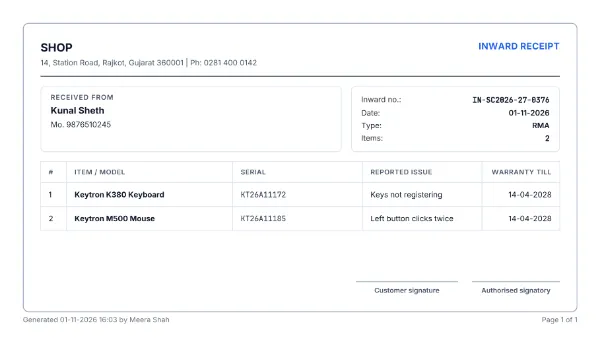
Inward receipt
For the customer, at the counter. RMA means a warranty claim.
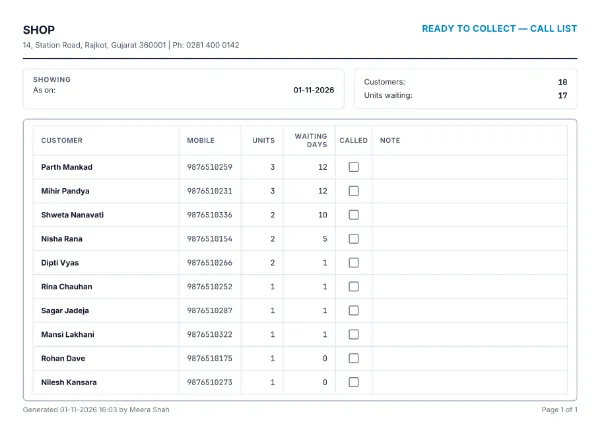
Call list
Who to ring about units that are ready.
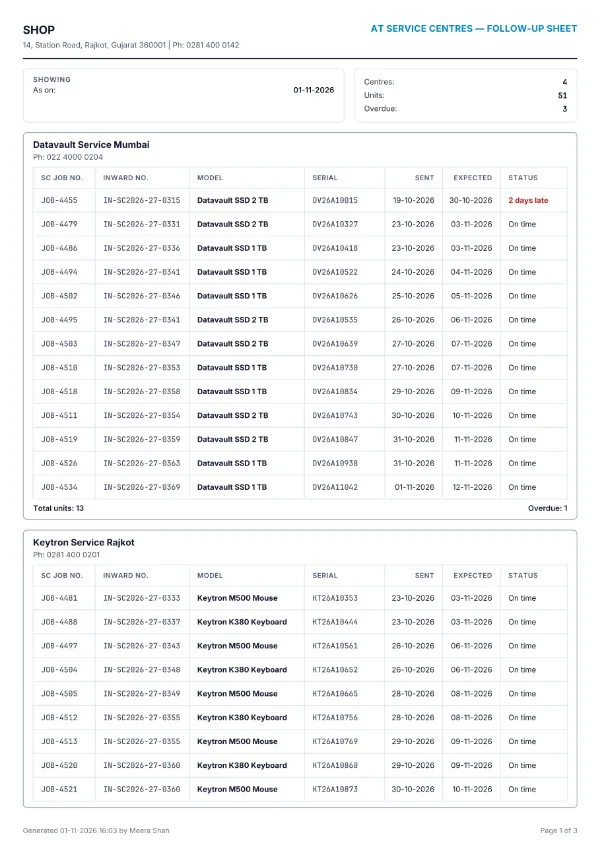
Follow-up sheet
What each service centre still holds.
Your shop’s records stay yours
Each shop’s data kept separate
Your records belong to your shop alone. No other shop can see or reach them.
Owner, Manager and Staff permissions
Each person can see and do only what their role allows, checked on every action.
Download all your data any time
The owner can download everything SKYRIS keeps for the shop as one ZIP of CSV files.
Remove a customer’s personal data
If a customer asks, a manager or the owner removes their name and contact details. Serials and warranty dates stay.
Signed-in sessions protected
Your sign-in is kept where nothing on the page can read it, and a user you deactivate loses access at once.
Start free, then choose a plan
Fourteen days free, with no card to enter. Plans differ only in users and WhatsApp updates.
Questions dealers ask
Who owns the data, and can I take it out?
The records you put in are your shop’s. The owner can download everything SKYRIS keeps for the shop as one ZIP of CSV files at any time, even after a subscription has ended, and every report exports to Excel and PDF.
When do WhatsApp updates start?
From the moment you sign up. Add your contact number in Company settings, since every update ends with how to reach you.
How are WhatsApp updates sent?
From the SKYRIS WhatsApp number, showing your shop’s name and phone. Each plan includes a number of updates a month, and a customer who says no at the counter gets none.
What support do I get?
Call, message or email us. The details are at the bottom of this page.
Bring your next replacement into SKYRIS
Take your first inward today and see the whole journey for yourself.